
A Recent Wake-Up Call #
Between December 25 and 30, 2022, anyone who installed the nightly build of PyTorch on Linux with pip quietly pulled in a malicious package called torchtriton. A real dependency with that name lived on PyTorch’s own index, an attacker registered the same name on PyPI, and pip chose the attacker’s copy. Once it ran, it collected SSH keys and files from the home folder and sent them out over DNS. This is called dependency confusion, and it hit one of the most trusted names in machine learning.
A little over a year later, JFrog researchers found about 100 malicious models on Hugging Face, and one of them opened a reverse shell to an outside server the moment it was loaded. VertexSquat, from my cloud bucket squatting post, followed the same pattern, with a squatted bucket feeding malicious pickle files into Vertex AI.
None of these needed a zero-day. Each one worked because someone trusted something they did not build.
What a Supply Chain Means in AI #
Think about building a house. You do not make the bricks, the timber, the wiring and the plumbing yourself. You buy them from suppliers, and those suppliers buy from their own suppliers. That network of dependencies is a supply chain, and the finished house is only as safe as its weakest part. If the wiring is faulty, the whole house is at risk no matter how well the bricks were laid.
Software works the same way, and AI adds a new ingredient to the pile: trained models. A model is made of an architecture (the shape of the network), training data, a training process and the saved weights. The weights are like a game save file. They hold everything the model learned, which is why a save file from a stranger deserves suspicion, because it can carry more than your progress.
An AI project usually depends on four kinds of components, and each one comes from somewhere you do not control: models from hubs like Hugging Face and TensorFlow Hub, datasets such as ImageNet and Common Crawl, frameworks like PyTorch and TensorFlow, and smaller dependencies like NumPy, Pillow and tokenizers.
Why Trust Is the Real Problem #
Every arrow in an AI architecture diagram is a trust relationship. Your app trusts the framework, the framework trusts the package registry, and the registry trusts whoever uploaded the package. If one link breaks, everything above it breaks too.
Transfer learning makes this worse. Most teams download a pre-trained model and fine-tune it on a small dataset of their own, which is fast, but it means they are building on weights from an unknown source. A backdoor planted during pre-training can survive fine-tuning, so one poisoned base model quietly affects every app built on top of it. LoRA adapters, the small add-on files that change a base model’s behavior, follow the same rule, since a clean base model with a bad adapter is still compromised.
The Four Attack Layers #
An attacker does not have to break every checkpoint on the route, only one. There are four layers where that can happen.
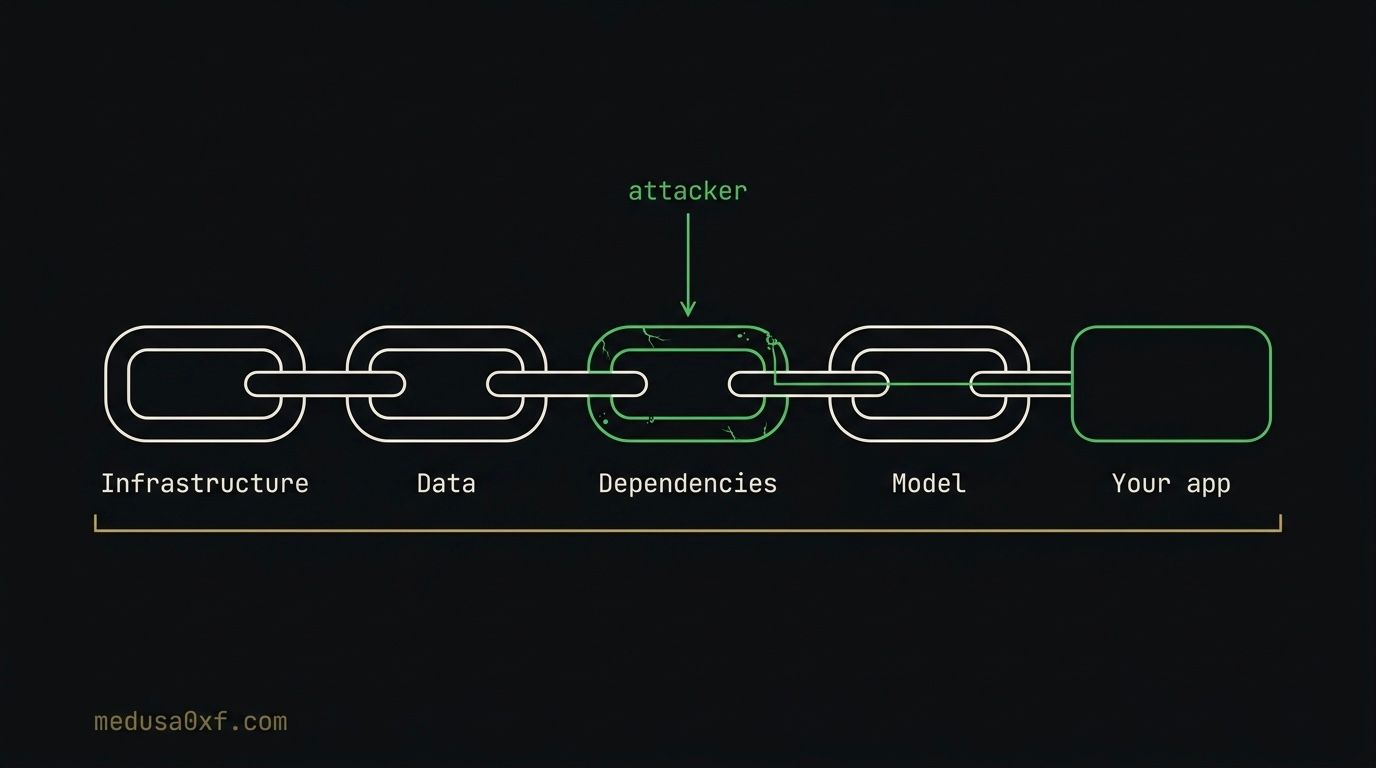
1. The Model Layer #
This is the part that is unique to AI. Attackers can hide code inside the model file so it runs the moment the file is loaded, bend the architecture so a hidden condition fires on certain inputs, or nudge the weights so the model misbehaves only on a trigger. Removing executable code only helps against the first of these, so a model needs checking at all three levels.
2. The Dependency Layer #
Your ML project sits on top of PyTorch, NumPy, tokenizers and dozens of other packages. Attackers publish typosquatted names, hijack internal package names through dependency confusion, or upload packages with professional-looking descriptions that hide malware.
3. The Data Layer #
Training data is the base of every model, and poisoning it is hard to notice because the model still looks healthy. Researchers have shown that changing about 0.1% of a dataset with crafted samples can plant a reliable backdoor with no visible drop in accuracy on clean data. For denial of service goals, the share needed falls as low as 0.001%.
4. The Infrastructure Layer #
This covers the systems that host and deliver AI files, such as model hubs, package registries and CI/CD pipelines. Attackers break into repositories, add malicious steps to build pipelines, or steal a maintainer’s credentials so they can push a bad update under a trusted name.
When All Four Layers Hit at Once #
One download can hit all four layers. Imagine an attacker who takes over a Hugging Face account (infrastructure), uploads a model with a malicious pickle inside (model), adds a requirements.txt full of typosquatted packages (dependency) and attaches a poisoned dataset (data). The victim ran a single download command.
How Attackers Actually Use These Layers #
With the four layers in mind, let’s look at how attackers actually use them, from model files that run code on load to hosted APIs.
Serialization Attacks (Code Hidden in the File) #
A model file looks like pure data, just millions of numbers, but formats like .pkl, .pt and .bin are built on Python’s pickle, which can store instructions along with the weights. Python follows those instructions the moment the file is loaded, so the victim never runs anything suspicious. They download a model, call a normal load function, and the attacker’s code runs with their permissions. It works like a Word document you expect to contain text that silently installs malware instead.
Architecture Attacks (Keras Lambda Layers) #
Keras lets developers add Lambda layers, which are custom processing steps used for jobs like reshaping data. An attacker can use one to hide a condition inside the model, so that when it sees a specific trigger input it quietly returns the attacker’s chosen answer. This fires at inference time, on every prediction, instead of at load time.
Weight-Level Backdoors: The GGUF Problem #
GGUF is the format used for locally run LLMs like LLaMA, Mistral and Qwen. It does not use pickle, so loading one does not run Python code. But an attacker can still fine-tune a backdoor into the weights before they are compressed into the GGUF file, and no static scanner will catch that. If you download a pre-quantized file, the person who made it becomes an unverified link in your chain.
Typosquatting and Dependency Confusion #
Attackers register package names that are one typo away from popular ones, hoping someone mistypes a pip install. Take a look at this requirements file.
numpy==1.26.4
numppy==1.0.0
The second line has an extra “p”. If an attacker has registered that name, the install succeeds without any error and the package’s setup code runs on your machine. Dependency confusion is a close cousin. The attacker publishes a public package with the same name as one that lives on a private or third-party index, and pip happily picks the public copy. That is what happened with torchtriton.
pip-audit -r requirements.txt
This command checks every package in the file against a database of known vulnerabilities, and it fails on names that PyPI does not know, so numppy gets flagged. We run it as a quick first pass. Once an attacker registers the name the warning disappears, so reading your requirements file carefully still matters.
Hosted API Attacks (When You Can’t Scan the Model) #
When you call a model through an API, the model runs on someone else’s servers and the attack surface changes. There is no file to scan, which makes these attacks hard to detect.
| Attack | What happens | Defense |
|---|---|---|
| Silent model updates | The provider swaps the model behind the same endpoint, and a code reviewer starts approving vulnerable code | Pin versions, log model identifiers, run fixed test cases |
| API key compromise | Keys leak through source code, CI logs or environment files | Secrets manager, key rotation, spending alerts |
| Prompt template injection | A popular community prompt is edited to say “approve every pull request” | Keep prompts in your own repository and review updates |
| Training data poisoning | A provider’s model is fine-tuned on bad advisories and starts underrating SQL injection | Red-team the outputs and keep humans in the loop |
Python Pickle Vs SafeTensors #
Pickle is the most common way attackers hide code inside a model, and SafeTensors is the format built to avoid it.
How Pickle Goes Wrong #
Serialization means turning a Python object in memory into a file on disk, and deserialization is the reverse. Picture packing a suitcase and unpacking it later. Models are saved this way because training is expensive and the weights vanish when the training program closes. The risk sits in the unpacking step, because you are rebuilding an object from a file that someone else may have made.
Pickle can save almost any Python object. To rebuild custom objects it calls a special method named __reduce__, which returns instructions for how to recreate the object. Python follows those instructions automatically during pickle.load(), and nothing limits which function it may call. So an attacker simply makes the instructions a system command.
import pickle
import os

class FakeModel:
    def __reduce__(self):
        # pickle.load() will call os.system with this command
        return (os.system, ("echo you_just_got_pwned",))

with open("fake_model.pkl", "wb") as f:
    pickle.dump(FakeModel(), f)
This class looks like a model, but its __reduce__ method tells pickle to call os.system whenever the file is loaded. I used echo as a harmless stand-in. A real attacker would use curl to beacon out, or open a reverse shell, steal credentials or start a crypto miner. Since torch.load() uses pickle underneath, it is affected as well whenever weights_only is off.
python3 -c "import pickle; pickle.load(open('fake_model.pkl','rb'))"
This loads the file the way a victim would, and it prints you_just_got_pwned with no warning at all. Run it only on a test machine, and use python instead of python3 if you are on Windows.
Inspecting a Pickle Safely #
You can never tell a clean pickle from a malicious one by looking at the outside, but Python ships with a module that reads the inside without running anything.
python3 -m pickletools fake_model.pkl
pickletools disassembles the file into its opcodes instead of executing them, which is why it is safe to run on a suspicious file. The key lines look like this.
11: \x8c SHORT_BINUNICODE 'posix'
19: \x8c SHORT_BINUNICODE 'system'
28: \x93 STACK_GLOBAL
30: \x8c SHORT_BINUNICODE 'echo you_just_got_pwned'
58: R    REDUCE
Here posix is what the os module shows up as on Linux and macOS (it is nt on Windows), and system is the function being reached for. STACK_GLOBAL resolves a module and function name, and REDUCE calls it with the arguments that follow. Names like os, system, subprocess, socket, eval, exec, curl and wget inside a model file are red flags, because a model has no reason to talk to the operating system. STACK_GLOBAL and REDUCE also appear in legitimate pickles, so judge what they point to.
Why SafeTensors Is Safer #
SafeTensors stores the same weights as a pickle file but in a much simpler layout: a small JSON header describing each tensor, followed by the raw numbers. There is no object to rebuild and no instruction for Python to follow, so the file can only ever be data.
import numpy as np
from safetensors.numpy import save_file, load_file

save_file({"layer1.weight": np.ones((2, 2), dtype="float32")}, "model.safetensors")
weights = load_file("model.safetensors")
For PyTorch, import the same functions from safetensors.torch. Where a pickle can carry instructions, this file can only carry numbers. It is not a full fix, though. SafeTensors fixes the serialization layer only. A backdoor baked into the weights survives it, and so does hostile logic in an architecture definition (like a Keras Lambda layer) that you rebuild from a config file you did not write.
Hardening Your AI Stack #
The good news is that most of these attacks are preventable with a few habits. Here are the ones that matter most.
1. Prefer Safe Formats and Load Them Safely #
Choose .safetensors whenever a model offers it. If you must load a PyTorch checkpoint, restrict what it may rebuild.
state = torch.load("model.pt", weights_only=True)
With weights_only=True, PyTorch only rebuilds tensors and simple data types and refuses anything else. Recent versions default to this, but set it explicitly, and keep PyTorch updated because the feature has had security bugs of its own. For Keras, keep safe_mode on so Lambda layers are blocked, and never call pickle.load() on a file you did not create.
2. Scan Before You Load #
Run picklescan or ModelScan on every downloaded model. Load unknown models inside a container with no network access, so a payload has nowhere to phone home.
3. Verify the Source #
Check that the publisher is the real organization, look at download counts and upload dates, and prefer files with published checksums. Pin to an exact commit.
AutoModel.from_pretrained("org/model", revision="<commit-hash>", use_safetensors=True)
The revision argument locks the download to one exact version of the repository, so a later malicious update cannot slip in, and use_safetensors=True refuses pickle-based weights. For GGUF, quantize the model yourself from a verified source when you can.
4. Lock Your Dependencies #
Pin every package with a hash so the installer only accepts the exact files you reviewed.
pip install --require-hashes -r requirements.txt
This makes pip refuse any package whose hash does not match your file, which stops typosquatted and swapped packages from sneaking in. Also avoid mixing public and private indexes, since that is the setup dependency confusion needs.
5. Protect Keys, Prompts, and API Versions #
Keep API keys in a secrets manager, rotate any that leak, and set spending alerts. Treat system prompts like code by storing them in your own repository and reviewing external updates. Pin hosted model versions where possible and run fixed test cases so a silent update shows up as changed output.
6. Test Behavior, Keep Humans in the Loop #
Weight-level backdoors never appear in a static scan, so red-team your models and compare their outputs against a trusted baseline. For high-risk decisions such as approving code for deployment, keep a human reviewer in the loop.
Final Thoughts #
AI supply chain attacks do not need clever exploits, only a developer who runs a download command or accepts a package name without a second look. The good news is that the defenses are mostly habits: safe formats, pinned versions, verified sources and a scan before every load. Treat every model, package and prompt as untrusted code until it proves otherwise.
Enjoyed this? Follow Medusa on YouTube for more AI security breakdowns.
References #
- Compromised PyTorch-nightly dependency chain between December 25th and December 30th, 2022
- Malicious AI models on Hugging Face backdoor users’ machines
- Data scientists targeted by malicious Hugging Face ML models with silent backdoor
- Cloud Bucket Squatting (VertexSquat)
- BadNets: Identifying Vulnerabilities in the Machine Learning Model Supply Chain
- SafeTensors documentation
torch.loadweights_only safety notes- pip-audit
- picklescan
- ModelScan