
A Recent Wake-Up Call #
In April 2026, security firm Focal Security disclosed three critical vulnerabilities in Google Cloud Platform products, all rooted in a single technique called “bucket squatting”. The affected products were Gemini Enterprise, Cloud Run, and Vertex AI.
GCP bucket names are globally unique across all organizations, meaning once a name is taken, no one else can use it. Focal Security researchers noticed that each of these GCP products used predictable bucket naming formats when provisioning resources. By registering those bucket names in advance, an attacker could sit and wait for a victim’s workload to start writing data into what it assumed was its own bucket, but was actually controlled by the attacker.
The consequences ranged from data theft and AI pipeline poisoning (GeminiSquat, CVE-2026-1727) to full remote code execution via malicious pickle files injected into Vertex AI experiments (VertexSquat, CVE-2026-2473). These weren’t theoretical bugs. They were pre-auth, cross-tenant attacks on production infrastructure at Google scale, all because of predictable bucket names.
What Is Bucket Squatting? #
Bucket squatting (also called bucket namesquatting) is when an attacker pre-registers a cloud storage bucket, on AWS S3, GCP Cloud Storage, Azure Blob, etc., using a name they predict a target will use in the future.
Cloud providers use a flat, globally shared namespace for bucket names. On AWS S3, every bucket name across every account in a region must be unique. On GCP, bucket names are globally unique across all organizations worldwide. This means the first person to claim a name owns it; there’s no “this bucket belongs to a specific organization” check at the naming level.
When a service or pipeline later tries to create or access a bucket by that predictable name and finds it “already exists,” it often just continues using it, writing files, logs, or sensitive data into a bucket it doesn’t own.
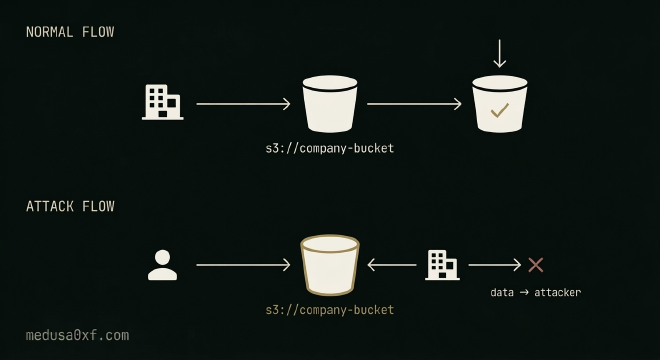
Conditions for Bucket Squatting #
When all three conditions line up, an attacker owns a bucket that a legitimate system trusts completely.
- The bucket name is predictable, based on project names, regions, dates, environment names, or other guessable patterns.
- The bucket hasn’t been provisioned yet by the legitimate owner.
- The service or workload doesn’t verify ownership of the bucket before using it.
Why Should You Care? #
At first glance, this might seem like a niche issue, but the impact can be devastating depending on what ends up in that bucket.
1. Data exfiltration #
If an application logs user data, uploads files, or stores any kind of sensitive output to a bucket, and that bucket is squatted, the attacker silently receives all of it. There’s no alert, no anomaly, no failed request. The application behaves normally, and the data flows straight to someone who shouldn’t have it.
2. Supply chain and code injection #
Build pipelines, deployment scripts, and CI/CD systems often pull dependencies, configuration files, or build artifacts from storage buckets. If an attacker squats that bucket before the pipeline provisions it, they can serve malicious versions of those files. A squatted build artifact bucket is effectively a code execution primitive with a very quiet entry point.
3. Remote Code Execution #
If a system loads serialized objects from a bucket, Python pickle files being the most common example, as seen in the VertexSquat case, an attacker can embed arbitrary code directly into those files. When the application deserializes them, the payload executes. No exploit, no vulnerability in the application itself. Just a trusted file path pointing to attacker-controlled storage.
4. Cross-tenant impact #
In multi-tenant cloud environments, the blast radius isn’t always limited to one organization. As the GCP findings showed, if a cloud provider’s own infrastructure uses predictable bucket names, squatting can affect any customer whose workload relies on that service, turning a single registration into a platform-wide attack surface.
How to Find Bucket Squatting in the Wild #
Bucket squatting is one of those vulnerabilities that hides in plain sight. The conditions for it are easy to overlook during a regular security review, and most automated scanners won’t catch it either. Finding it requires understanding how a system provisions resources and thinking one step ahead of that process. Here’s a practical approach.
Step 1: Understand the target’s bucket naming patterns #
Start with recon. Look for existing bucket references in JavaScript files, frontend source code, API responses, and historical URL data using waymore and the Wayback CDX API. Tools like Katana and gospider are great for crawling live applications and surfacing embedded storage URLs. Once you have a handful of real bucket names, try to extract the convention, is it company-env-region? projectname-assets-prod? company-YYYY-MM? The pattern itself is the vulnerability.
For deeper JS analysis, tools like JSMiner and metasecjs surface bucket references that don’t always appear in rendered output. Configuration objects, SDK initializations, and lazy-loaded modules often carry bucket names that a simple crawl misses, these are worth hunting specifically.
Step 2: Map provisioning behavior and predict what comes next #
Once you understand the naming convention, shift your thinking toward when new buckets would be provisioned. Does the pattern include dates, region names, or environment labels like staging, uat, or dr? Is the organization expanding to new cloud regions, launching a new product, or running a migration? These are the moments when new buckets get created automatically, often with the same predictable pattern.
Use cloud_enum or s3scanner to check which predicted names already exist and whether they’re owned by the target or sitting unclaimed.
Step 3: Check ownership, not just existence #
This is where most assessments fall short. Security teams often check if a bucket exists and stop there. What matters is who owns it. Query the predicted bucket names and pay attention to what comes back. On AWS, use the CLI anonymously:
aws s3 ls s3://predicted-bucket-name --no-sign-request
For GCP, you can use gsutil the same way:
gsutil ls gs://predicted-bucket-name
- NoSuchBucket: The name is unclaimed. This is your squatting window.
- AccessDenied: The bucket exists but is private. Someone owns it.
- Successful listing: The bucket is public. Cross-reference the account ID in response headers (
x-amz-request-id,x-amz-id-2) with what you’d expect from the target. - Listing returns no relevant content: A bucket that exists but shows nothing related to the organization is worth a closer look. It may already be squatted.
Step 4: Confirm that the system actually trusts the bucket #
Identifying a predictable unclaimed name is only half the job, the other half is confirming the system will blindly use it. Trigger the relevant workflow: deploy a resource, run a pipeline, initiate a sync. Watch whether the system interacts with your predicted bucket name in error messages, response headers, or SDK logs. Those passive signals are often enough to confirm the trust assumption without ever registering the bucket yourself.
Step 5: Define the impact clearly #
Don’t just report “I found a predictable bucket name.” Build the impact chain. What does the service write to this bucket? User data? Logs? Build artifacts? Machine learning models? The higher the sensitivity of what ends up there, the higher the severity.
How to Prevent this? #
For developers and security engineers, the good news is that bucket squatting is entirely preventable.
1. Use unpredictable names #
Add a cryptographically random suffix to every bucket name. Something like companyname-logs-a3f9b1c7 is functionally impossible to guess and squat. Never use patterns based on dates, region names, or environment names alone.
2. Pre-provision all buckets at deploy time #
Don’t let workloads create buckets on the fly. Create every bucket your application needs as part of a controlled infrastructure provisioning process, before any workload runs. This way, the names are claimed by you before an attacker can get there.
3. Verify bucket ownership, not just existence #
Verify bucket ownership, not just existence. Before writing to any bucket, check that it belongs to your account or organization. On AWS, you can use HeadBucket combined with account-level policies. On GCP, use IAM conditions and domain-restricted sharing. A bucket existing is not the same as a bucket belonging to you.
4. Lock down CDK bootstrapping defaults (AWS). #
The AWS Cloud Development Kit creates staging buckets with a default naming pattern of cdk-{qualifier}-assets-{account-id}-{region}. Customize the qualifier, don’t leave it at the default. AWS now documents this explicitly, and it’s a quick fix with real impact.
Final Thoughts #
Bucket squatting doesn’t require a zero-day, it requires understanding how a system provisions resources and recognizing the naming patterns it relies on. The signals are subtle: a bucket reference in a JS file, a region in a changelog, an environment name in a config. But when those signals come together, the impact can be critical.
Enjoyed this? Follow Medusa on YouTube for more cloud security breakdowns, live bug hunting, and hands-on attack walkthroughs.